Online Image Resizer
Images Selected
0 imagesImages are processed in your browser. Resizing does not upload your files to a conversion server.
Need to Resize Images online free without installing software? Our Online Image Resizer makes it easy to change image dimensions in just a few clicks. Resize single photos or resize multiple images online in one batch, with support for JPG, JPEG, PNG, WebP, and GIF formats. Adjust your pictures quickly in your browser for websites, social media, documents, and online forms.
Looking for a free image resizer to reduce image dimensions or resize images in KB for an upload requirement? Customize width and height, maintain the original aspect ratio, and adjust image quality to help reduce file size. You can also resize bulk JPG, PNG, JPEG, WebP, and GIF images together. For requirements such as an image resizer up to 20KB, results depend on the original image and selected settings, so check the final file size before uploading.
What Does It Mean to Resize Images Online?
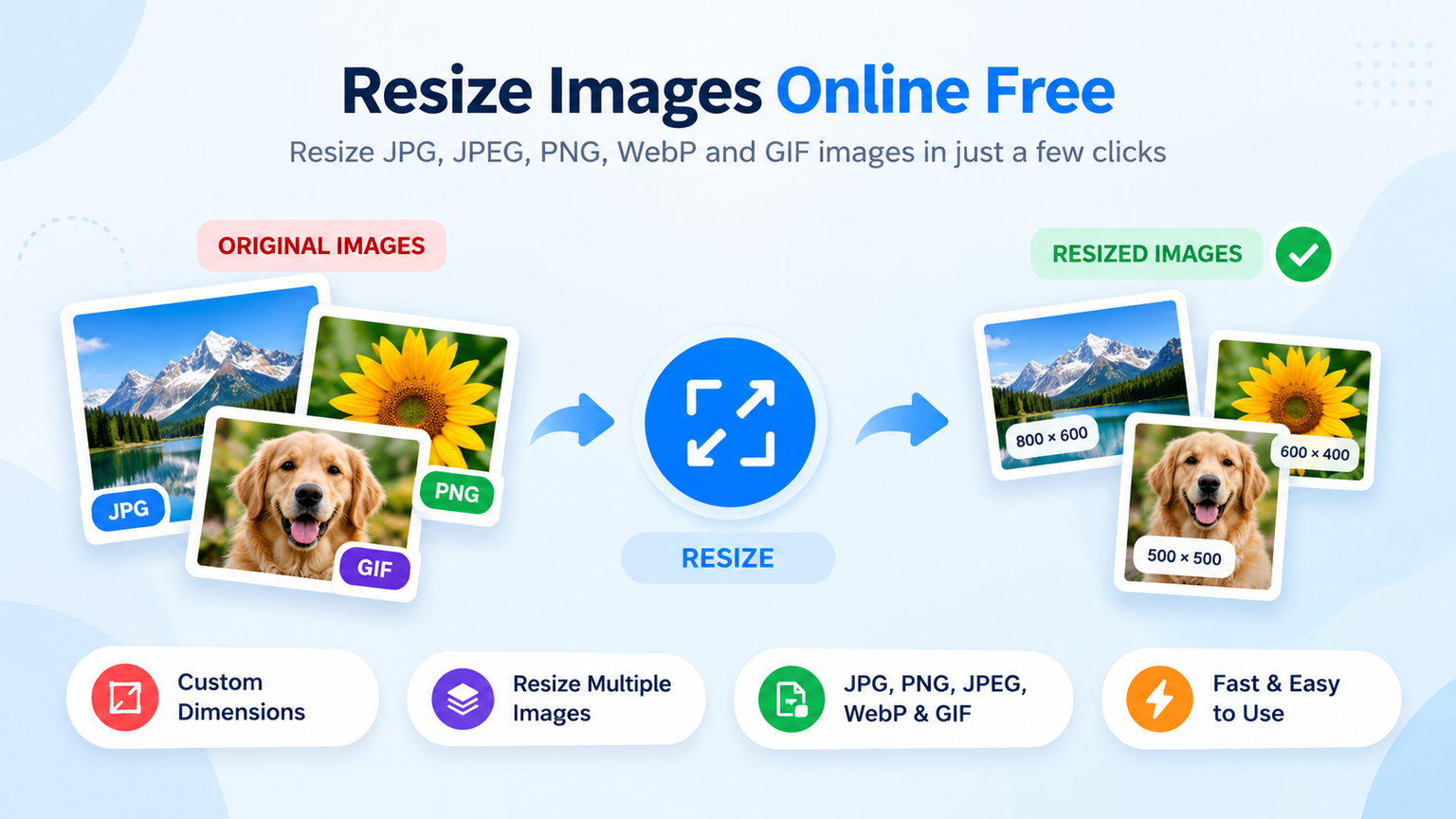
Resizing images online means changing the width and height of a picture to fit your needs without installing desktop software. With our free Online Image Resizer, you can resize images online free, adjust dimensions, and process multiple pictures in one batch. Whether you work with JPG, JPEG, PNG, WebP, or GIF files, this simple free image resizer helps prepare images for websites, social media, online forms, and other digital uses.
If you need to resize multiple images online, create smaller versions of photos, or resize images in KB to meet an upload limit, you can adjust image dimensions and image quality. The tool supports bulk resizing for JPG, PNG, JPEG, WebP, and GIF images, helping you manage several files more efficiently. For specific limits, such as 20KB, the final file size depends on the original image, format, dimensions, and quality settings, so check the result before uploading.
Why Use Our Tool to Resize Images Online?
Our free Resize Images Online Free tool makes it easy to adjust image dimensions without installing software or paying for a subscription. Use our Online Image Resizer to resize JPG, JPEG, PNG, WebP, and GIF images, customize width and height, and process multiple pictures directly in your browser. Whether you need smaller images for a website or pictures that meet upload requirements, our free image resizer offers a simple and convenient solution.
- Free Online Image Resizing: Use our Resize Images Online Free tool without subscription fees.
- Multiple Image Support: Resize Multiple Images Online in one batch instead of editing each picture individually.
- Multiple Format Support: Resize bulk JPG, PNG, JPEG, WebP, and GIF images in one convenient place.
- Custom Image Dimensions: Adjust image width and height to suit your website, social media, documents, or online forms.
- Aspect Ratio Control: Keep the original proportions of your pictures while resizing.
- Help Reduce File Size: Adjust image dimensions and quality when you need to resize images in KB for upload limits.
- Quick Image Downloads: Preview your resized images and download the files when processing is complete.
- Mobile and Desktop Friendly: Resize pictures using a smartphone, tablet, laptop, or desktop computer.
- Browser-Based Processing: Resize your images online without installing separate image-editing software.
Whether you want to optimize website pictures, prepare photos for online applications, or use an image resizer up to 20KB for a file-size requirement, our tool helps you adjust images with greater convenience. The final file size depends on the original image, dimensions, format, and quality settings, so check the result to ensure it meets your required limit.
How to Resize Images Online for Free?
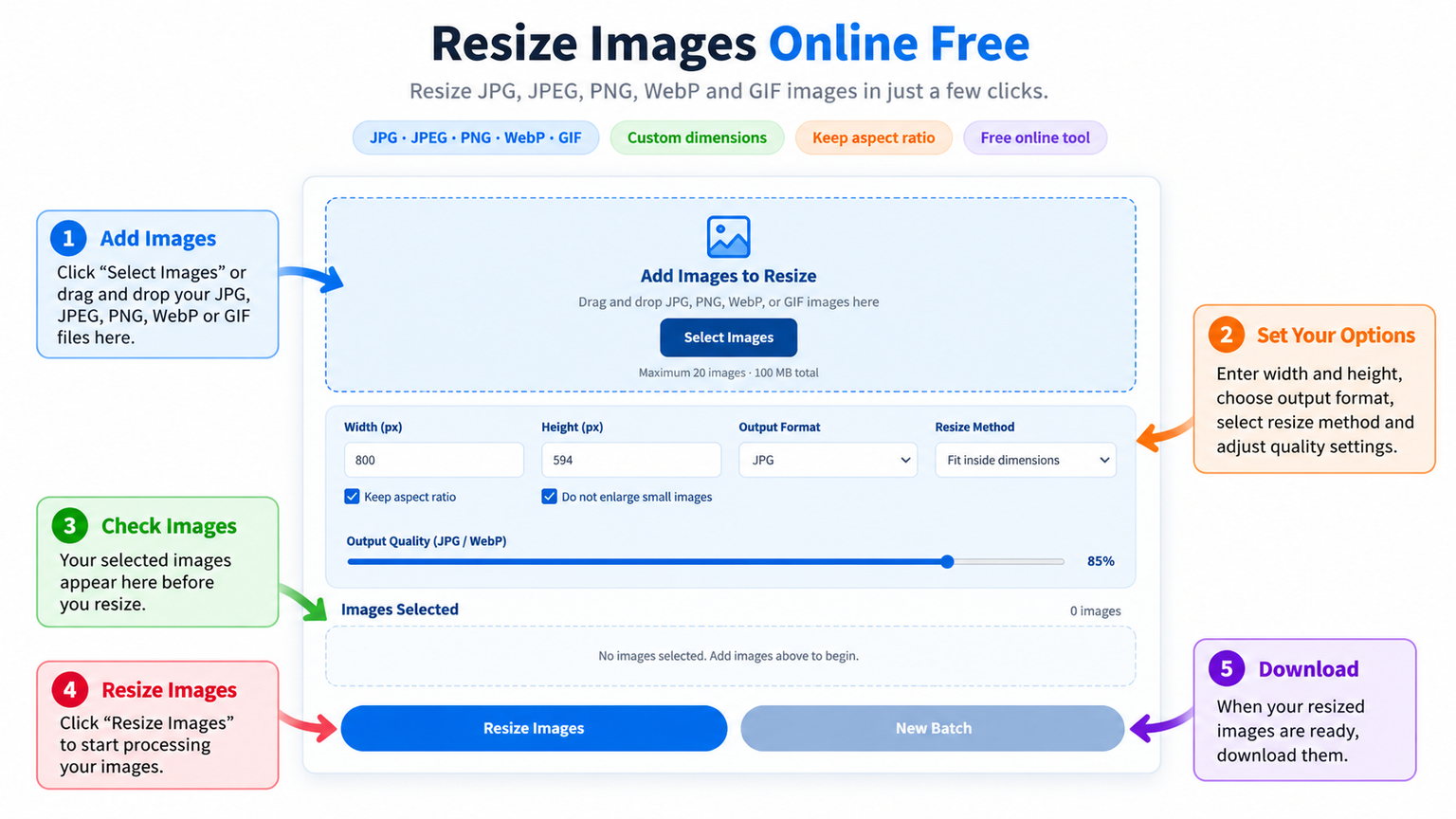
Resizing pictures is simple with our Online Image Resizer. You can resize images online free by following a few easy steps, whether you need to adjust one photo or resize multiple images online in a single batch. No advanced editing skills or software installation is required.
Step 1: Upload Your Images
Select or drag and drop your JPG, JPEG, PNG, WebP, or GIF files into the tool. You can upload multiple images together to resize bulk JPG, PNG, JPEG, WebP, and GIF images more conveniently.
Step 2: Set Your Image Dimensions
Enter your preferred width and height to resize your pictures according to your needs. Keep the aspect ratio enabled if you want to preserve the original proportions, or adjust the dimensions to suit a specific requirement.
Step 3: Choose Your Output Settings
Select your preferred output format, such as JPG, PNG, or WebP, and adjust the available quality settings when supported. If you need to resize images in KB or meet an image resizer up to 20KB requirement, try smaller dimensions or suitable quality settings. The final file size will vary depending on the image and your settings.
Step 4: Preview and Download Your Resized Images
Check the resized image previews to make sure they look right. Download your finished pictures individually or use the available batch options to save multiple resized images. Your files are processed directly in your browser, making it easy to use this free image resizer on a computer, tablet, or mobile device.
Tips for Better Results When You Resize Images Online
Follow these practical tips to get useful results from our free image resizer:
- Choose the Right Dimensions — Set the width and height according to where you plan to use your images, such as a website, social media post, or online form.
- Keep the Original Proportions — Maintain the aspect ratio to prevent pictures from appearing stretched or distorted.
- Select a Suitable Format — Use JPG or JPEG for many photographs, PNG when transparency is needed, and WebP when suitable for your website or project.
- Resize Multiple Images Together — Use the tool to resize bulk JPG, PNG, JPEG, WebP, and GIF images in one batch and save time.
- Adjust Quality Settings Carefully — For supported formats, reducing quality can help lower file size, although excessive compression may affect image appearance.
- Resize Images in KB When Needed — If a website or application has a file-size limit, experiment with smaller dimensions and suitable quality settings. For an image resizer up to 20KB requirement, check the final file size because results depend on the original image and selected settings.
- Preview Before Downloading — Review your resized images to make sure the dimensions and visual quality meet your needs.
- Keep Your Files Organized — Use clear file names so your resized pictures are easy to identify and upload later.
With our Resize Images Online Free tool, you can adjust image dimensions, process multiple pictures, and download your resized files directly in your browser. Whether you’re preparing photos for a website, reducing image sizes for online applications, or organizing pictures for everyday use, our Online Image Resizer offers a convenient way to resize images without installing additional software.
Resize Images Online Free — Start Now
Stop editing pictures one at a time. Use our free image resizer to change image dimensions quickly and conveniently. Upload your JPG, JPEG, PNG, WebP, or GIF images, choose your preferred settings, and download the resized files when processing is complete.
Upload your images. Adjust your dimensions. Download your resized pictures.
Benefits of Resizing Images Online
Using a free image resizer helps you prepare pictures for different digital needs without complicated editing software. Our Resize Images Online Free tool lets you change image dimensions, process multiple files, and adjust image quality directly in your browser. Whether you’re working with personal photos or website graphics, you can resize images more conveniently and save time.
- Save Time: Resize multiple images online in one batch instead of editing each file separately.
- Adjust Image Dimensions: Set custom width and height to fit websites, social media, documents, and online forms.
- Support Popular Formats: Resize bulk JPG, JPEG, PNG, WebP, and GIF images with ease.
- Help Reduce File Size: Change dimensions and quality settings when you need to resize images in KB.
- Prepare Images for Uploads: Create smaller image versions for platforms with size or dimension restrictions.
- Maintain Image Proportions: Keep the aspect ratio enabled to avoid stretching or distorting your pictures.
- Use It on Any Device: Access our Online Image Resizer from your mobile phone, tablet, laptop, or desktop.
- No Software Installation: Resize images online without downloading a separate application.
If you need an image resizer up to 20KB, you can experiment with smaller dimensions and suitable quality settings to approach your target. The actual file size depends on the original image and selected settings, so always check the downloaded file before submitting it.
FAQs
Is It Free to Resize Images Online?
Yes, our Resize Images Online Free tool lets you adjust image dimensions without paying for a subscription or installing additional software. You can resize supported images directly in your browser.
Do I Need an Account to Use the Online Image Resizer?
No account or sign-up is required. Open our Online Image Resizer, upload your pictures, choose your preferred dimensions and settings, and download the resized images.
Can I Resize Multiple Images Online at Once?
Yes, you can resize multiple images online in one batch. Upload several supported pictures, apply your preferred settings, and process them together instead of resizing each image individually.
Which Image Formats Does Your Free Image Resizer Support?
Our free image resizer supports JPG, JPEG, PNG, WebP, and GIF images. You can select a supported output format based on your needs and the available settings.
Can I Resize Images Without Losing Quality?
Resizing can affect image quality, particularly when you reduce dimensions significantly or lower compression quality. For the best results, choose suitable dimensions and review the preview before downloading your resized images.
Can I Resize Images in KB?
Yes, you can adjust image dimensions and use the available quality settings to help reduce file size. If you need to resize images in KB for an upload limit, the final size will depend on the original image, format, dimensions, and selected quality settings.
Can I Resize an Image to 20KB?
You can try to reach a 20KB file-size requirement by reducing image dimensions and adjusting the available quality settings. However, our image resizer up to 20KB does not guarantee an exact file size, so check the final image before uploading it to a website or application.
Can I Resize JPG, PNG, JPEG, WebP, and GIF Images in Bulk?
Yes, you can resize bulk JPG, PNG, JPEG, WebP, and GIF images using the batch upload feature. This makes it easier to prepare multiple pictures for websites, documents, social media, and online forms.
Can I Resize Images on My Mobile Phone?
Yes, you can use our Online Image Resizer on supported smartphones, tablets, laptops, and desktop computers. Open the tool in your browser, upload your pictures, adjust the settings, and download the resized files.
Will Resizing Images Reduce Their File Size?
Reducing image dimensions or adjusting quality settings can help lower file size. However, the amount of reduction depends on the image format, original dimensions, image content, and selected settings.
Are My Uploaded Images Stored Online?
Images are processed directly in your browser using the tool’s client-side processing. Your files do not need to be uploaded to a conversion server for resizing. For sensitive images, you should still review the website’s privacy policy before using the tool.
Can I Keep the Original Image Proportions When Resizing?
Yes, enable the aspect ratio option to maintain the original proportions while changing image dimensions. This helps prevent your pictures from appearing stretched or distorted.